New releases
EasyCoach gets a shared org library
Admins can now save top-performing roleplays to a shared org library in EasyCoach, organised into folders by topic or team. Anyone in the organisation can browse, duplicate, and customise from the library. Admins control the folder structure. Members browse and reuse.
PowerPoint to video, fully automated
The EasyVideo PowerPoint to video feature is now fully upgraded. Upload a deck and EasyVideo handles the rest. It reads your speaker notes and slide content, writes a script per scene, adds avatar or voice narration, and aligns the timeline automatically. You go from deck to publish-ready video in minutes.
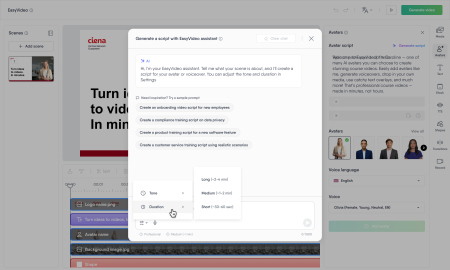
AI video script assistant
A script assistant now lives inside the EasyVideo editor. Describe a topic and get a full narration draft straight away. If you already have a script, refine it in one click: simplify it, summarize it, or adjust the tone. You set the tone and length before generating, and the output follows e-learning best practices by default.
Version control is out of beta
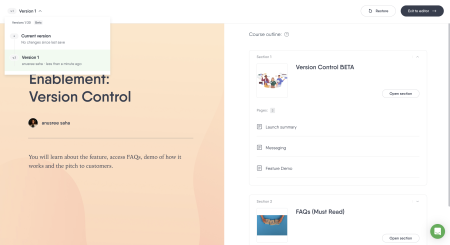
Version control launched in beta last month for Enterprise customers. It now lets you open any saved version of your course, compare it against the current state, restore it if needed, and switch back at any time. Nothing gets lost in the process. The 20-version limit from the beta release remains in place.
From Thursday, July 2, Version control will also be available for Teams plans.
EasyTranslate is now available on every trial
Every 14-day trial now includes full EasyTranslate access. Open a course, choose your languages, and publish a translated version in one session. If you have been curious about EasyTranslate but haven’t had a chance to test it, now you do.
Product improvements
Choose the formality level for your translations
When translating a course, authors can now set the tone of the output: Automatic, More Formal, or Less Formal. This applies to full course translations and to individual block retranslations. The option is available for 10 languages, including French, German, Spanish, Japanese, and Portuguese.
Media library, one click from the course header
The full media library (images, videos, audio, and documents) is now accessible directly from the course header. You no longer need to open the editor first. A small change that removes a step you made dozens of times a day.
Copy section
Authors can now copy a section directly from the course they are viewing, creating a fully independent copy that belongs to that course. This replaces the Re-use sections feature, which we will be phasing out. More details on that timeline to come.
Google added as an AI provider in EasyAI
Google is now an approved subprocessor and a first-class AI provider in EasyAI, alongside OpenAI, Azure OpenAI, and Anthropic. It plugs into the existing failsafe and provider smart-switcher system.
A note on questions becoming content blocks
Questions are moving. Soon, instead of living on separate pages, questions will sit inside content pages alongside text and images. You will be able to mix questions with content freely, add multiple questions to one page, and build more flexible learning flows.
Your existing courses will update automatically. Nothing will be lost, and your published courses stay live. Expect a slightly different look in the editor, but a much more flexible authoring experience overall.
Coming soon
The EasyAI Agent. The EasyAI Agent is the first built-in AI co-author in e-learning. Tell it what you need and it creates, refines, and restructures content across your whole course through conversation, with your context and instructional best practices applied automatically.
Collaboration in EasyVideo. Co-authors will be added to your video automatically from the parent course, with no setup needed. Multiple authors will be able to edit simultaneously, see who is working on which scene in real time, and make changes to individual translated versions independently.