Introduction – Making a fun and engaging learning process
We’ve all been to sessions where the trainer clicks through PowerPoint slides while giving a lecture. That’s because PowerPoint is great for one-sided presentations, where one speaker does all the talking. But it’s not the right tool to engage learners. Engagement requires interactivity and a degree of learner autonomy to take an active role and acquire knowledge organically at their own pace.
If you want learners to acquire the information you’re sharing with them, the most effective way is to use interactive, engaging methods. For example, quiz questions, bite-sized nuggets of microlearning content, and instant feedback supplied automatically in response to the learner’s actions.
Modern e-learning platforms like Easygenerator offer these options. They make the learning process engaging and effective. While training with PowerPoint can often feel like a passive experience for learners, acquiring knowledge through interactive e-learning software is usually perceived as more fun and engaging. That’s precisely the kind of learning experience you want to provide to ensure your learners get the most out of the training experience.
Later in this guide, we’ll show you how to convert your PowerPoint slides into an interactive e-learning module. First, let’s review the pros and cons of using PowerPoint.
PowerPoint advantages and disadvantages
Even though PowerPoint is not the right tool to create engaging e-learning, it does come with advantages. And, of course, also with various disadvantages. Let’s look at both the pros and cons.
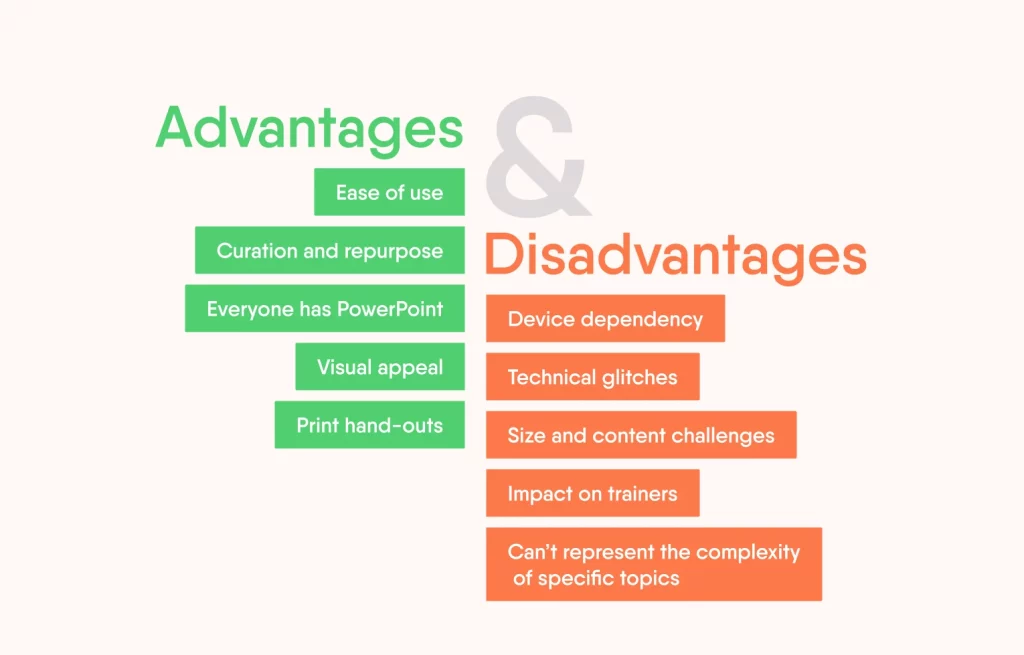
TOP 5 reasons why PowerPoint is not the best solution for e-learning.
Advantages
- Ease of use: Ease of use is the number one reason for many subject-matter experts and L&D professionals to get started with PowerPoint-based courses. It is almost always available in many organizations and allows you to make a quick start without spending a lot of time understanding the features or functions.
- Curation and repurpose: According to research estimates, there are more than 120 million presentations created in education and business environments. That’s a lot of unprocessed knowledge! The first step of your knowledge-sharing strategy should be to leverage this existing content. The surplus PowerPoint decks in every computer can be potential information to search for e-learning content. You can save a lot of time by curating what’s out there already instead of creating content from scratch. Think about recycling as a metaphor, which is an eco-friendly learning technique.
- Everyone has PowerPoint: PowerPoint dates back to the early times of e-learning when it was the only tool to create digital content for a presentation, a sales pitch, training, or other presentation. It is an all-in-one tool. That suggests the dominance of the Microsoft Office tool on our computers. And it continues to be dominant because Office consists of software many companies use and find affordable. Despite not being a classic instructional design tool, PowerPoint enables anyone to make a quick start.
- Visual appeal: Using the standard templates and themes, trainers or subject-matter experts can easily create visually appealing content. That doesn’t require any graphic design knowledge because it comes with packaged high-quality graphics and animations like transitions, action settings, and sound settings.
- Print hand-outs: As PowerPoint was the most preferred medium by classroom instructors, a print and PDF functionality is a must-have to allow easy hand-outs for participants during sessions. Printing hand-outs is a built-in feature and doesn’t require additional settings or actions, unlike the authoring tools.
These advantages explain why PowerPoint remains the default choice for so many organizations. But they can also become obstacles to better learning. As Bobby Burchill, Training Development Manager at ProPharma, noted in a recent webinar on video in e-learning:
“It’s very much familiar, isn’t it? We’ve used it for 30 years or more. Nobody likes change. And unless you want to and you’ve got that will to see what’s possible, then if you’ve got a deadline for next week and you’ve got a PowerPoint ready made and you can just make a tweak, you’re going to change it like that. You’re updating it and sending it out as quickly as possible to meet that deadline.”
Familiarity and deadline pressure often win out over better learning design, even when teams know PowerPoint isn’t the ideal tool.
Disadvantages
- Due to the bulleted and linear nature of PowerPoint content, the tool can’t represent the complexity of specific topics. It needs advanced effects and interactivity for further exploration.
- Device dependency: Microsoft Office and PowerPoint make authors dependent on their devices. The web-based versions could be a solution if they didn’t limit working with transitions, effects, interactive content, and editing media. That means authors are always restricted to their devices.
- Technical glitches: Authors and learners often face difficulties with rebooting their computer — PC not responding, power issues, or glitchy display. That makes for a bad experience for authors and learners, especially in modern SaaS times.
- Size and content challenges: Visually appealing presentations tend to be heavy and can cause delays in file-sharing. Yet, PowerPoint slides without visuals are just never-ending lists of text, which can bore online learners.
- Impact on trainers: If trainers are not cautious, they may end up reading the slides of their presentations instead of explaining the matter’s crux. This type of training makes for the worst learning experience.
Convert PowerPoint to e-learning
For many organizations, the first step toward online learning is to rework their existing face-to-face PowerPoint content and turn it into a virtual version. But the trap is that learning strategies created for a face-to-face classroom setup may not be as effective in a digital environment. And vice versa. It’s a good idea to leverage existing learning resources, but this way isn’t going to work.
Also, it’s crucial to avoid overloading your online learners with content. PowerPoint often involves lots of text and information on each slide — a big turn-off if you’re trying to keep your learner’s attention.
So, what can you do? Let’s look at some steps you can take to convert face-to-face PowerPoint content to online training successfully:
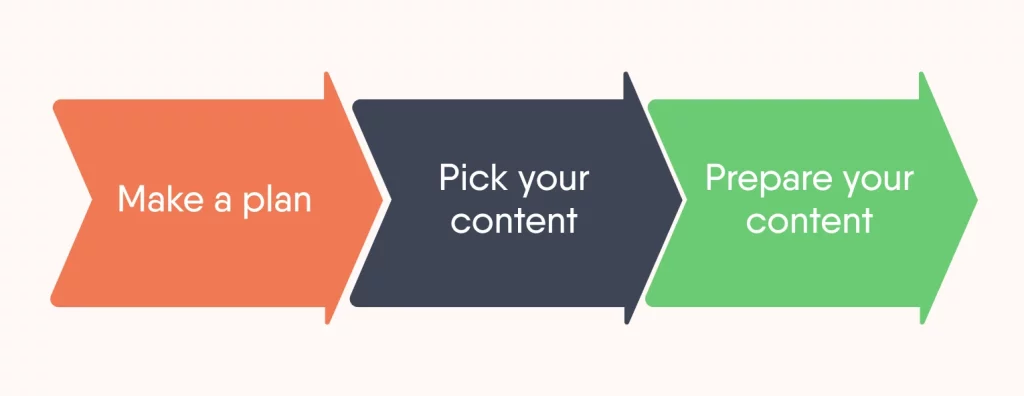
Make a plan
Think about your learners’ needs and changing environments. For instance, a classroom training experience is different from taking a training in front of a computer. Do consider the limitations of a virtual learner before reusing a PowerPoint for digital learning needs.
Pick your content
Pick and choose the slides that most support your learners’ needs. Attention spans online sessions are short. Learners are likely to concentrate for about 30 seconds or less. That requires trainers to carefully plan short and snappy content instead of running a 60-minute session on par with the classroom variant. That’s why it’s vital for trainers to:
- Select the right bits of knowledge to meet the needs
- Represent these bits in consumable nuggets.
Prepare your content
Turn your slides into interactive content in an authoring tool. Go beyond the bullets: a PowerPoint list can become a text-image block, or you can switch it for a video, hotspot-question, or audio fragment. You can also change the navigation or substitute a group of 10 slides with a 1-minute video.
Shedding PowerPoint habits
There is another way to work through your PowerPoint content: shedding your old habits. This requires more than just switching tools. It requires a shift in how organizations think about quality and contribution. As Nada Hazem, Product Lead for EasyVideo at Easygenerator, explained in the same webinar:
“Corporate learning strategies sometimes don’t make it safe for employees to contribute to content creation. We see that people need to know what an e-learning video or course actually looks like, what is good, what is considered good enough, and maybe you show that through the impact it actually creates.”
When teams are stuck in PowerPoint’s presentation mindset, they often judge learning content by the wrong standards. The key is to create courses in the right order. The correct order for writing any e-learning course, whether you’re using Easygenerator or want to convert PowerPoint to online training, should be as follows:
- Define your learning objectives
- Formulate assessments
- Create content.
1. Define your learning objectives
Before you sit down and start writing pages of text about the training topic, focus on what you want to achieve. Ask yourself: what new knowledge or skills should the learner acquire by taking this e-learning course? Be as specific and realistic about the objectives as possible. The more precise, the better.
If you’re having a hard time coming up with clear learning objectives, read the tips in our article about using learning objectives, which are based on Bloom’s Taxonomy.
2. Formulate assessments
Once you know your learning objectives, use them to guide you towards the kind of assessment you want your learners to answer. After all, completing an assessment is the best way for the learner to demonstrate that they have acquired the expected knowledge or skills.
Often, the assessment will be in the form of a test. That means the learner will need to either answer questions or perform an action correctly to demonstrate they have gained the necessary knowledge or skill. Focusing on your learning objectives for the course, think of what the learner will need to do successfully to show that they now have the knowledge or skill you’re trying to teach them.
3. Create content
Now you’re ready to create the content. Ensure that it clearly states the learning objectives initially and is explicitly geared towards completing the assessment. By limiting your content only to that specific information, you’re sure to avoid PowerPoint-style cognitive overload and achieve the learning objectives you set out to achieve. If you do still use PowerPoint, this is a way to turn it into online training.
Start creating interactive learning experiences
Now that you know the right steps for how to make interactive PowerPoint training, you’re ready to move beyond passive, content-heavy training slides and convert your PowerPoint into an interactive e-learning module. . And with a user-friendly authoring tool like Easygenerator, you and the experts in your company will be turning out high-quality, engaging e-learning content in no time.
Stop using PowerPoint for e-learning
Presentations and training are very different things. The former is about presenting slides, it’s a one-way street of giving information. The latter, however, lets people self-learn all the time without a presenter. Effective online courses are based on strong instructional design principles that reinforce the concept of self-learning and discovery with little intervention by the instructor.
That means we wouldn’t ask you to stop using PowerPoint, which is, after all, one of the easiest tools to create content. Here’s a breakdown of the differences between e-learning and PowerPoint courses that can probably help you decide.
| Parameter | PPT | E-learning |
|---|---|---|
| Creation | No instructional design principles are applied and the content is generally linear in sequence. | Solid instructional design principles are embedded while creating a course and learners have autonomy of sequence. |
| Access | PowerPoint courses need MS PowerPoint which is mostly desktop based, although a web variant exists. | Most e-learning courses are created with web-based authoring tools that are device or application agnostic. |
| Interactivities | You can add basic text blocks, imagery, and animations. This is limited compared to advanced interactions other tools offer. | You can add any type of medium and advanced user interactions like hotspots, drag and drop, web frames, and games. |
| Assessments | You can include quizzes, but an instructor has to manually evaluate the answers. | Quizzes are automatically assessed because e-learning authoring tools often have built-in logic for evaluation. |
| Social dimension | It is more of an instructor’s tool and may not offer interaction with learners. It tends to be a teacher-centric, lecture-style narrative. | Learner interaction is made possible through various interactive activities and games. |
| Maintenance | You can easily and quickly edit or reorder slides and their content. | Editing content in SaaS-based e-learning tools is easy. The challenge persists if you opt for a desktop-based authoring tool. |
| Conversion | If you convert a presentation into a video, you risk losing all interactivities. | You can convert a course or add, embed, or upload a video inside a course. |
| Distribution | It is difficult to distribute heavy PowerPoint files among a large number of learners. | Courses are usually SaaS-based and shared via links. |
| Device compatibility | Presentations are not adapted for smartphones and tablets. | Multi-device and cross-browser compatibility are default options for many e-learning courses. |
| Progress | It is difficult to track because most PowerPoints are saved locally. | You get a wide choice of progress tracking, from basic completion metrics to advanced learner progress. |
Transforming PowerPoint to e-learning
Ready to convert your PowerPoint to interactive online training? We’re here to help you get started. Among the free resources we offer is a webinar on transforming PowerPoint into interactive e-learning.
In this webinar, our e-learning expert walks you through 3 practical ways to convert your PowerPoint into online training, including tips to leverage our tool, Easygenerator. When using Easygenerator, you can also leverage our latest feature, the PowerPoint converter, which allows you to import your slides directly into our tool and convert them into an interactive e-learning course.
Stay up to date with our webinars
If you enjoy our webinar content, be sure to check out our webinar page. Here, you’ll get the latest updates on our upcoming webinars, so you never miss a beat. You’ll also get to tune into recordings from our past webinars, which we always publish with an accompanying transcript.
Our expert-led webinars cover a wide range of e-learning topics. Explore our webinar page to find a free training session.
Conclusion
PowerPoint training requires a presenter, while e-learning just needs highly engaging content that learners can dive into on their own. In either case, the role of pedagogy still reigns high and always precedes the technology you use to create training content.
Given the nature of modern worker’s learner autonomy, information relevance and short content are the must-haves in any training content. That’s why PowerPoint trainers may have to weigh their options to create future content in order to take these tenets into account.
All in all, we recommend looking for blended options, like our own authoring solution that allows you to import your slides and continue editing them as an e-learning course. This allows for a quick switch from PowerPoint to e-learning and paves the way for future online strategies.